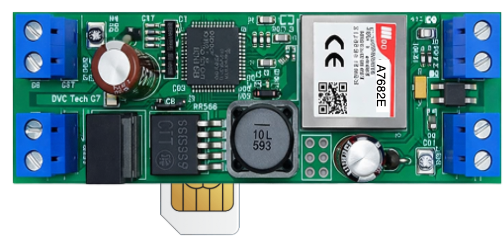
MODEMS DVC POINT – QUICK START +

DVC POINT — QUICK START (2G / LTE / Wi-Fi)

(for technical specialists)

For equipment selection and technical support, contact us. We’ll help you figure things out and choose the right solution.

  1. What it is
    DVC POINT is an industrial RS-485 ↔ TCP/IP modem.
    The modem works as a transparent data channel with https://dvc-cloud.com

  1. Quick start (4 steps)

Step 1. Power connection
Apply power to the соответствующие terminals:
7–12V (all models)
⚠️ Wi-Fi ISO: maximum 9V


Step 2. Communication setup (connect antenna)
Choose an option:
For GSM modem insert a SIM card (with internet)
For Wi-Fi modem prepare:
SSID (network name)
password

Step 3. Initial setup via RS-485 port  (Fig. 1)
Connect USB–RS485 adapter to the modem and computer, open configurator  
https://division.business/download-dvc-configurator/ ,
(Can also use other serial port software, for example Hercules)

Default parameters:
9600 baud
8N1

Send commands:

For GSM (2G/LTE):
:CMD{IPADDRPORT:”203.161.41.45″,”6050″;}CRC:1234

For Wi-Fi:
:CMD{SSID_PASSWORD:”YOUR_WIFI”,”PASSWORD”;}CRC:1234
:CMD{IPADDRPORT:”203.161.41.45″,”6050″;}CRC:1234

Register the device in DVC CLOUD:
https://dvc-cloud.com

Fig. 1

Step 4. Power on
Turn on the device
Wait ~30 sec


  1. Status check (by LED blinking)
    1 time / 2 sec – normal operation
    1 time / 0.5 sec – ❌ no network
    1 time / 0.2 sec – ❌ no connection to server
    fast (0.2 sec) – reconnecting

  1. Operation check
    After connection the device sends a packet:
    #DIVISION_M2#ID#RSSI#…#

This means:
connection is established
data is transmitting


  1. Output control (example)
    Send command from server:
    :CMD{DOUT:1;}

Result:
output will close for 2 seconds


  1. Important
    By default the modem connects to:
    IP: 203.161.41.45
    PORT: 6050 (DVC CLOUD)

You can set your own server:
:CMD{IPADDRPORT:”111.222.333.444″,”12345″;}


  1. Common issues

❌ No connection:
SIM without internet
wrong APN (operator)
weak signal
antenna not connected

❌ No connection to server:
wrong IP/PORT
server does not accept TCP / device not registered

❌ No response via RS-485:
A/B swapped
wrong baudrate


  1. Minimal connection
    Power → +V / GND
    RS-485 → A/B
    SIM or Wi-Fi

That’s it — device works as TCP tunnel


  1. Main working logic

This is not just a modem — it is a transparent TCP client:
connects to server by itself
sends all RS-485 data to socket
sends all socket data to RS-485
No data processing — only transport in packets up to 1024 bytes


(For using the modem in your own projects use the full manual)
https://division.business/download-dvc-configurator/

An example of the LTE modem connection diagram is shown in Fig. 2

Below are diagrams with pin assignments for different modem versions

For equipment selection and technical support, contact us. We’ll help you figure things out and choose the right solution.